Setpoint: Food & Lifts is a food and health diary for iPhone. What you log
stays on your phone. There is no account to create, no server of ours that
ever sees your data, and no analytics. The food database ships inside the app,
so searching, scanning and logging work with the network off.
Where your data is
On your iPhone
The diary, weigh-ins, body composition, tape measurements, progress
photos, habits, workouts and your profile live in the app's own storage.
If you use iCloud Backup they are part of your phone's backup, like any
other app's; that is Apple's backup, not a service of ours, and we have no
access to it. Turning on Advanced Data Protection makes that backup
end-to-end encrypted. See Backup in the
Privacy Policy.
In an export, when you make one
Settings builds a single JSON file on the phone and hands it to the iOS
share sheet. It goes only where you send it. See Export.
Three things reach the network, each started by you: a barcode the
bundled database does not know is looked up on Open Food Facts (the barcode
is sent, nothing about you); a web link you paste is fetched once to read
the recipe or nutrition facts it publishes; and, at most once a month, a
check of our server for a newer food database, which is installed only
when you ask. Nothing else is sent anywhere: there is no account, no
analytics, and no server of ours that holds your data. See the
Privacy Policy.
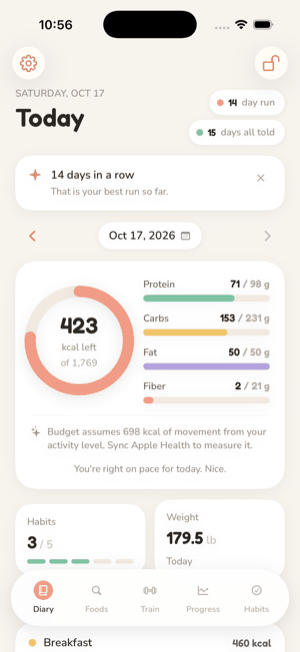
Four meals a day, totals against a daily budget, a bundled database of
USDA and Open Food Facts foods, barcode scanning, on-device label scanning,
custom foods and portions.
One formula: resting energy from Mifflin–St Jeor times 1.1, plus half
the day's measured movement from Apple Health. The diary says where the
day's movement figure came from.
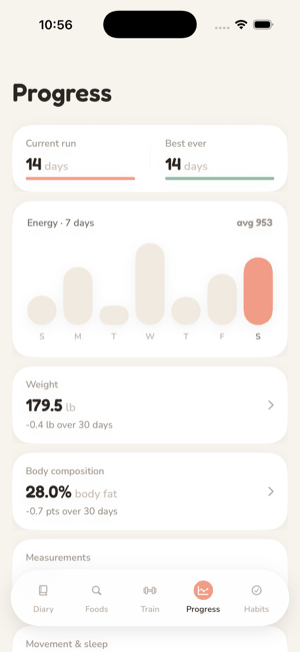
Weigh-ins typed here or read from a scale through Apple Health, one per
day. Body fat and lean mass as a 14-day median trend, never a single
reading, and never an input to the budget.
It will not nag. Reminders are off until you turn one on, fire at a time
you pick, and say only what they are for. Nothing is sent because you have
been away.
It will not colour your day. Totals are numbers against a budget, not a
verdict. A measurement that went up is a number that went up.
It will not reward eating less. The only run it counts is days logged,
and a large day keeps it alive exactly as well as a small one.
It will not phone home. There is no account, no sync service and no
analytics. The one thing it asks our server, at most monthly, is whether
a newer food database exists, and it says so on the Settings screen. The
data sources are credited inside the app under About & Licenses and on
the Data sources page.
Requirements
iPhone running iOS 26 or later. Apple Health features need a device with
Health; the Apple Watch is optional and only matters for measured movement,
sleep and recorded workouts.
Support
There is no account and no server, so there is no ticket system and no
way for us to look up your data. Support is one person reading one mailbox:
support@theboringlayer.com.
Expect a reply within a week; a day or two is usual.
Your export is the diagnostic. When something looks wrong,
the only record of what the app did is on your phone, and the export is how
you can show it to us. In the app: Settings → Your data → pick a timeframe
→ Build a JSON export → Save or share the export. The
Export page explains what the file holds.
Before you attach it, know that it contains what you logged for the
timeframe you picked: meals, weigh-ins, measurements, workouts and habit
ticks, plus your profile (date of birth, sex, height, weight and goal).
Choose a timeframe that covers only the days in question, or open the file
and remove what you would rather not share. It is plain JSON. A description
of what you expected to see, what you saw instead, and the day it happened
is usually enough on its own.