Apple Health is where a scale, a Watch and other apps already put their numbers. Setpoint can read some of them and write a few of its own. Every connection is separate, off until you turn it on from the screen that uses it, and limited to the types listed here. Health data the app reads stays on the phone and is used for the screen or the budget it was connected for, nowhere else.
| Connection | Turned on from | Reads | Writes | Used for |
|---|---|---|---|---|
| Movement | Progress › Movement | Active energy burned | Nothing | The day's movement figure in the energy budget. |
| Weight and composition | Progress › Weight | Weight, body fat percentage, lean body mass, from other sources only | Weight, for weigh-ins you type here | Weigh-ins and the composition trend. Pulled each time the app comes to the front. |
| Waist | Progress › Measurements | Waist circumference, from other sources only | Waist circumference, for readings you type here | The waist site under Measurements. |
| Steps | The step habit's own screen | Step count, as daily totals | Nothing | The "Walk 7,000 steps" habit and the Movement & sleep screen. |
| Sleep | Progress › Movement & sleep | Sleep analysis, the last 14 days | Nothing | Bedtime, wake time and consistency on that screen, and the "Get up at your usual time" habit. |
| Workouts | Session history, or Settings before an export | Workouts, with each one's average heart rate and energy burned | Nothing | Watch recordings in Session history and the export. Heart rate is read only as a workout's summary statistic, never on its own. |
| Share food log | Settings › Apple Health | Nothing | Dietary energy, protein, carbohydrates, total fat and fiber | Letting other apps read your food log. Described below. |
Where the app writes a value it typed, it replaces only its own earlier sample for that day and never another source's. A value that came from Health is never written back. Deletions do not propagate in either direction. The app's own samples are excluded when it reads, so nothing it wrote is ever counted twice.
Read permissions in Health are opaque to an app: a denied permission and an empty result look identical. "Connected" therefore means you asked for it, and a connection that returns nothing shows as nothing rather than as an error. A read that fails outright, as when iOS wakes the app while the phone is locked, is treated as unknown, never as zero.
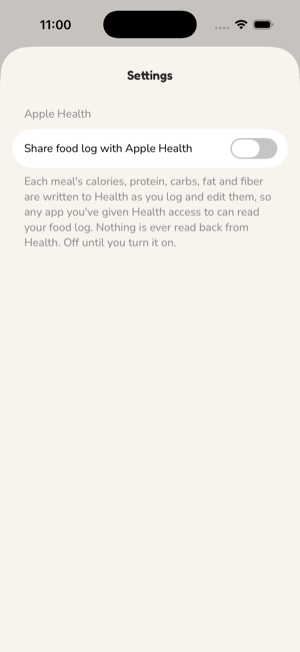
This is the one connection that puts your diary into Health. It is off until you turn it on, and the switch says what it does: each meal's calories, protein, carbs, fat and fiber are written to Health as you log and edit them, so any app you have given Health access to can read your food log. Nothing is ever read back from Health.
Health asks for permission to write the five dietary types and nothing to read. Then the app asks how far back to share: from today, the last 30 days, the last 90 days, or everything. A switch flipping must never push months of history into Health on its own, so the range is always your choice.
You choose between Stop, keep what's shared and Stop and remove it from Health. The default is to keep it: what is already in Health may be relied on by other apps, and deleting data you may depend on elsewhere is worse than leaving it. Removal deletes every sample this app wrote, by id. If removal fails, sharing stays on and the app says so rather than pretending.
The export records whether sharing is on and from which day, so a reader of the file knows another store may hold a copy of the diary.
Almost always this is the read permission. iOS never tells an app that a read was refused; it hands over no samples, which looks exactly like a scale that wrote nothing. So the Weight screen can say Synced while reading nothing at all.
Check it here: Settings → Health → Data Access & Devices → Setpoint. Under Allow to read, turn on Weight. For the composition screen, also turn on Body Fat Percentage and Lean Body Mass.
How it happens: the permission sheet Health shows when you connect lists every type switched off. Tapping Allow without turning the types on grants nothing, and the app has no way to know.
How to tell: the Weight screen shows a second line under its Apple Health row after each sync. Newest from Health: 17 Oct 2026, 06:42 means Health handed over samples and names the latest one. If the sync received nothing from the last 60 days, the line says so and points at the setting above.
The fix takes effect the next time the app comes to the front. There is nothing to reinstall, and nothing you typed is affected: a weigh-in you entered yourself always keeps its day.
Dietary types are never read from Health. Heart rate is never queried on its own. Nothing is read from a connection you did not turn on.
See also: the Privacy Policy.